Your whole shop.
One screen.
ShopFlow OS is the production management platform built for custom sign, woodworking, and fabrication shops. Track every order from Square to delivery, keep your team aligned, and give clients a portal they'll actually love — without the enterprise price tag.Launching soon. Get on the list for early access and founding-shop pricing.
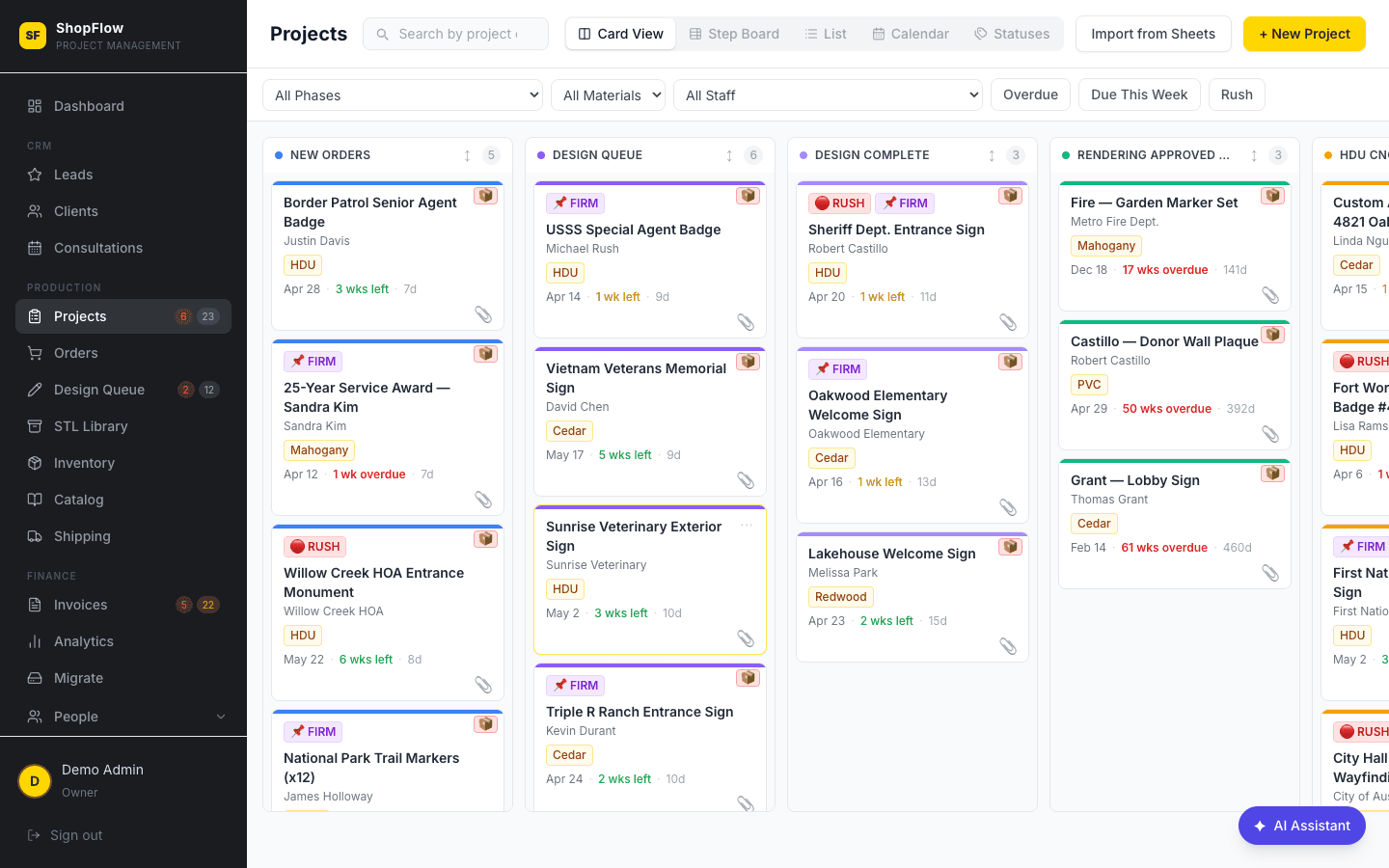
Total order visibility
Every project on one kanban board. Drag to move phases, filter by material or urgency, and see at a glance what's overdue, due this week, or waiting on design.
AI-powered intake
New Square orders are automatically parsed by AI into structured production items — no manual data entry. Split a single sale into three production tracks in seconds.
Client portal included
Every client gets a branded portal with real-time order status, design approvals, and invoice payments. Fewer phone calls. Happier clients.
Sticky notes. Whiteboards. "Where's my order?"
- • Orders lost between Square, email, phone, and walk-ins
- • Production status lives in someone's head
- • Clients calling weekly to ask where their sign is
- • Design files buried in email threads
- • Payroll calculated by hand every Friday
- • No idea if the shop is profitable until month-end
One platform. Everything connected.
- ✓ Every Square sale auto-parsed into production items
- ✓ Visual kanban from intake to delivery
- ✓ Client portal replaces status phone calls
- ✓ Design approvals handled without email
- ✓ Time clock feeds payroll automatically
- ✓ Live revenue and delivery rate on your dashboard
23 modules. One unified system.
Production, design, CRM, inventory, shipping, invoicing, staff, time clock, payroll, analytics, and AI — built together, not bolted on.
Project Kanban Board
Every active order, one drag-and-drop view.
The heart of ShopFlow OS. Every order lives on a visual kanban with fully customizable production phases — from New Orders through Quality Check to Ready for Pickup. Drag a card to move phases, filter by urgency or material, and know at a glance what's overdue.
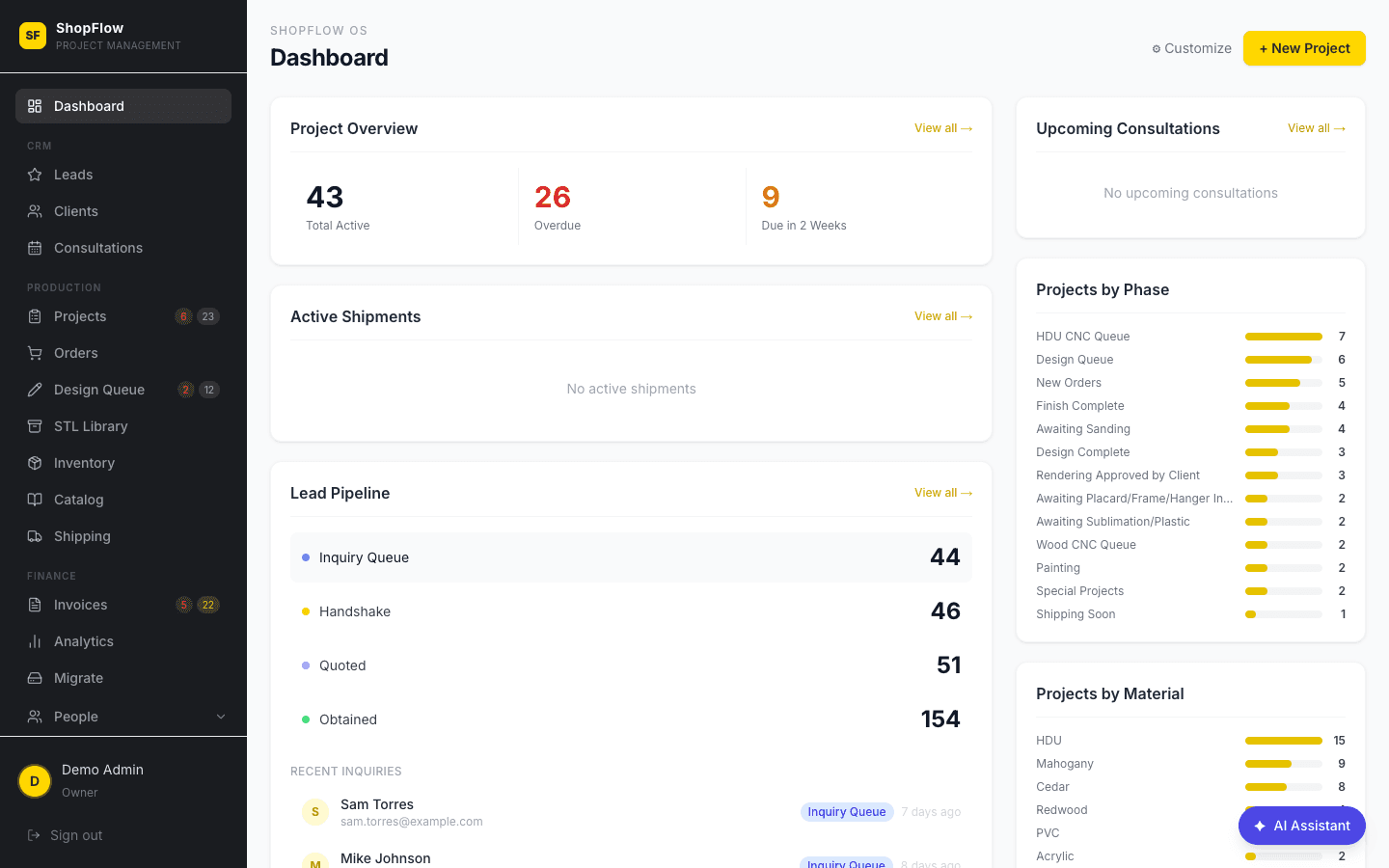
Admin Dashboard
Your whole shop in one glance.
The first thing you see when you log in — a real-time snapshot of active projects, revenue this month, new leads, overdue orders, and the next seven days of due dates. No more digging through spreadsheets to know how the shop is doing.
Project Detail
One record, every detail.
Click any card to see the full project: item breakdown with dimensions, material, finish, mounting, plaque text and color, production items, design status, renderings, and the full phase history. Manual edits are tracked with who and when.
Design Queue
Design work, organized and on-schedule.
A dedicated workspace for every design request. Track status from Queued through Customer Review to Approved, assign designers, count revision rounds, and let clients approve renderings without logging in.
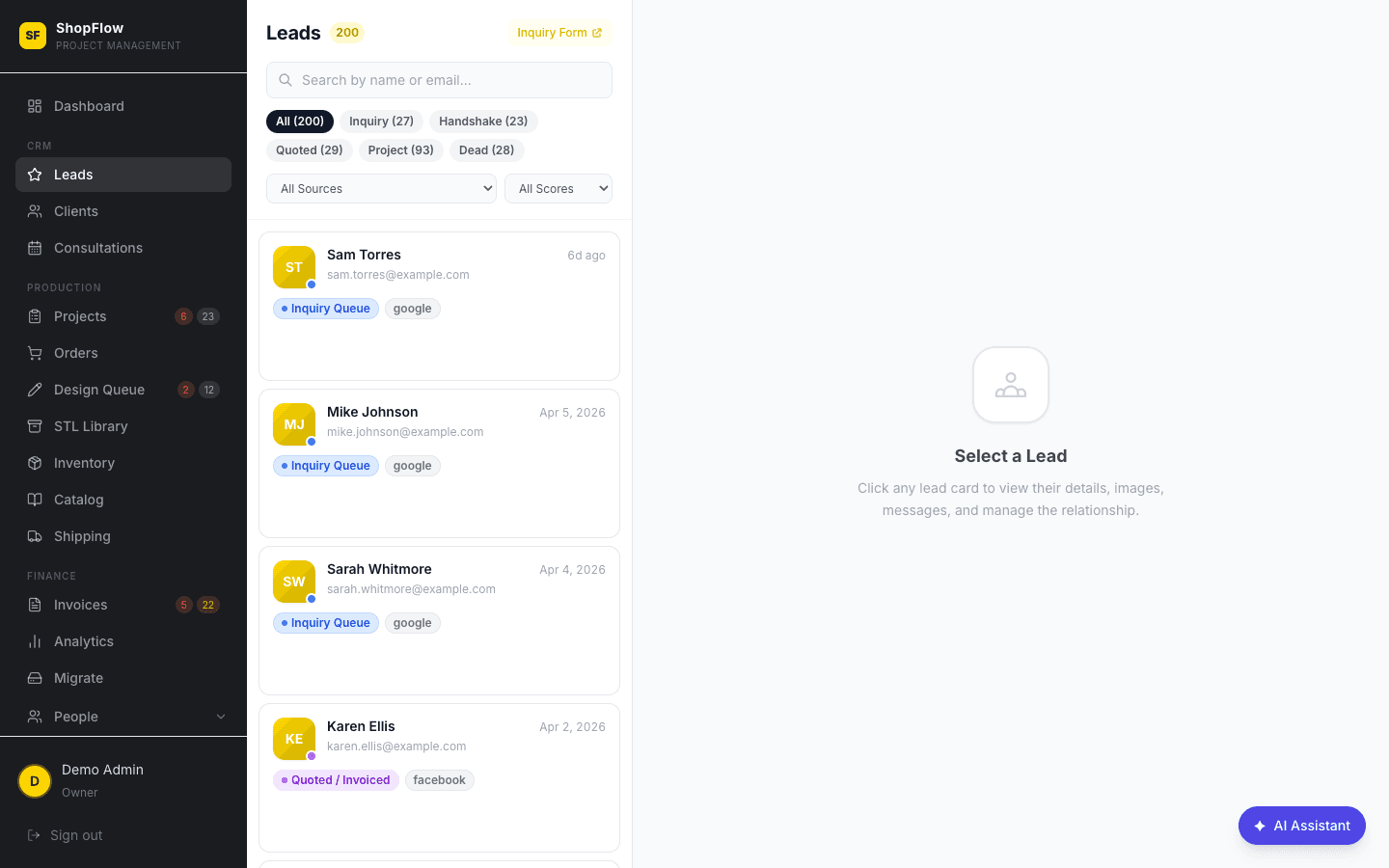
Leads Pipeline
A real CRM, built for shops.
Track prospects from first contact to closed order. Visual pipeline stages, lead source, quote amount, follow-up reminders, and one-click convert-to-project. Lost reason tracking gives you the data to close more next quarter.
Inventory Management
Materials tracked without a spreadsheet.
Track HDU, mahogany, frame stock, hardware, and finishing supplies with live stock levels, cost per unit, and supplier info. Usage ties back to production items automatically, and low-stock alerts tell you when to reorder.
Shipping & Delivery
Outbound orders under control.
Manage every shipment from the shop floor. Pick carrier and method, enter tracking numbers, and trigger automatic client notifications on shipment and delivery. Local delivery, freight, and customer pickup all handled the same way.
Invoices & Payments
Invoicing integrated with production.
Generate itemized invoices directly from project data, accept Square card payments online, and give clients a no-login portal to pay. Track Draft, Sent, Paid, and Overdue status and watch monthly revenue in real time.
Advanced Invoicing
Milestone billing, split payments, and full audit trails.
Go beyond basic invoicing with milestone-based billing — each milestone gets its own due date and payment schedule. Split a $12,000 monument sign into design deposit, production payment, and installation balance. Track disputes with who opened them and why, see every status change in a timestamped audit trail, and flag line items as taxable or non-taxable.
Staff & Team
Your crew, organized.
A clean staff directory with role-based access — Admin, Production, Design, and Sales each see only what they need. Assign projects, track performance notes, and keep your team aligned.
Granular Permissions
Every employee sees exactly what they need — nothing more.
Go beyond basic roles with per-employee permission grants. Control access to projects, clients, analytics, inventory, timeclock, payroll, staff management, and design queues individually. Track each team member's skills so the right person gets assigned to CNC routing, hand-carving, or gold leaf finishing.
Time Clock
No more paper punch cards.
Employees clock in and out from any device — phone, tablet, or shop computer. Weekly timesheets, automatic break deductions, overtime alerts, and admin overrides. Everything feeds directly into payroll.
Payroll
Calculated from the clock, not by hand.
Pull hours straight from the time clock. Supports hourly and salary employees, automatic 1.5x overtime after 40 hours, weekly or bi-weekly pay periods, and export-ready summary reports.
Task & Workflow System
Step-by-step instructions your crew can actually follow.
Build task templates with detailed step-by-step instructions, reference photos, and skill requirements — then assign them to the right team member. Staff see exactly what to do, ask questions in threaded Q&A, and mark steps complete as they go. Tracks open, pending review, and done status with time estimates and priority levels so nothing falls through the cracks on a busy shop floor.
Product Catalog
Your offerings, organized and ready to quote.
Manage your full product lineup — carved signs, plaques, badges, dimensional letters, monument signs — with images, pricing presets, and templates. Bulk import from existing inventory, set display ordering for client-facing views, and pull product specs directly into new quotes and invoices.
Design Library & Archive
Every design your shop has ever produced, searchable and organized.
Archive completed designs with state and jurisdiction tagging — find that Florida police badge design or the California HOA monument sign in seconds. Folders match your Google Drive structure automatically, so files live in one place but are accessible everywhere. A centralized library that grows more valuable with every job you complete.
Data Sources & Integrations
Pull in your data from everywhere — no middleware, no Zapier.
Connect the tools you already use without paying for middleware. Import Square invoices selectively with a preview before committing. Migrate Trello boards with attachments intact. Map Google Drive folders to projects. Receive Meta lead form webhooks, sync shipping through Shippo, send SMS via Twilio, and import email history — all configured from one admin screen.
Consultations & Video Calls
A full client meeting workspace, not just a calendar slot.
Propose multiple time slots and let the client pick. Then meet face-to-face right inside ShopFlow OS — built-in Daily.co video on the left, a live collaboration panel on the right. Build itemized pricing during the call, share design files, take shared and private notes, and convert to a lead or invoice with one click when you hang up.
Analytics & Reporting
Know your numbers, finally.
Revenue by month, on-time delivery rate, average production time by phase, lead conversion rate, material usage trends, staff productivity, and design turnaround. Export to CSV for anything deeper.
Notifications & Alerts
The whole team, always in the loop.
Email via Resend and SMS via Twilio — clients get order updates, design approval requests, and shipment alerts. Staff get overdue warnings and phase changes. Configurable per event.
AI-Powered Features
Less typing, more building.
AI parses new Square orders into structured production items, drafts item descriptions from specs, and writes design briefs from order details. A human-in-the-loop Review & Split step keeps you in control of multi-item orders.
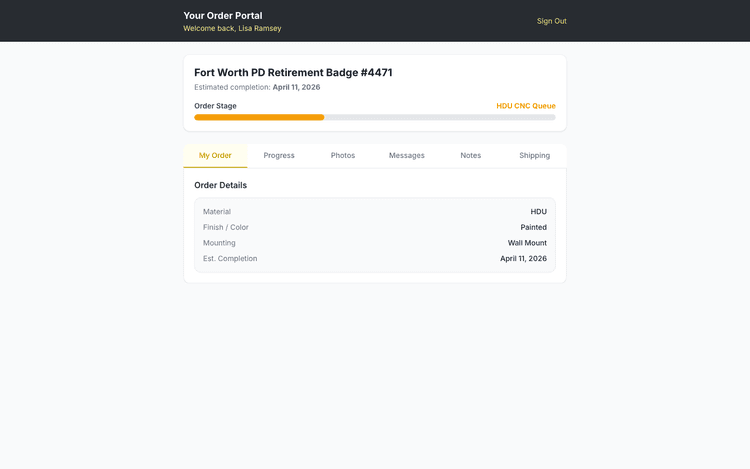
Client Portal
A branded portal for every client. No login required.
Every client gets a secure portal accessed by email link — no password, no signup. They see real-time order status ("Your sign is in: Quality Check"), approve renderings, view and pay invoices, download finished designs, and message the shop. Replaces every "where's my order?" call you've ever taken.
Public Inquiry Form
A 4-step configurator that turns visitors into qualified leads.
More than a contact form — a guided 4-step experience that walks prospects through contact info, sign vision, project details, and consultation booking. An interactive sign configurator lets them pick shape, material, size, and mounting style with a visual builder, so you get a real spec instead of a vague email. Embeddable on any website, every submission drops straight into your Leads pipeline with full context.
Built for every role in your shop.
Admin sees the big picture. Designer focuses on creative work. Staff gets a clean task list. Clients check their own portal. Same data, different views.
Admin / Owner
Full dashboard, production kanban, invoicing, payroll, analytics, and every configuration tool.
Designer
Prioritized design queue, file versioning, revision rounds, and client approval workflows.
Staff
Assigned tasks, personal time clock, production board — only the tools they need.
Client Portal
Real-time order status, design approvals, invoice payments, and messaging — no login.
See it for yourself.
Jump into a fully loaded demo with real-looking data. Pick a role — admin, designer, staff, or client — and explore every feature. No signup required to start.
Integrates with the tools you already use
Desktop. Tablet. Phone.
ShopFlow OS is fully responsive — manage your shop from the office computer, the shop floor tablet, or your phone on the drive home. No app to install. Just open your browser.
Questions, answered.
Everything shop owners ask us in the first ten minutes. Can't find what you're looking for? Try the demo or email us.
- ShopFlow OS has three plans. **Starter at $49/month** covers solo operators and 1–3 person shops with up to 5 users and 100 projects/month. **Shop at $129/month** adds the full operating system — design queue, time clock, payroll, granular permissions, advanced invoicing, consultations with video, and unlimited users. **Studio at $229/month** is for established shops that want automation, multi-location, API access, and priority support. Save 20% by billing annually. Founding shops lock in these rates for life — see [the full pricing page](/pricing) for details.
- Yes. Every new Square order automatically flows into ShopFlow OS as a project — AI parses the line items into production specs (material, size, finish, mounting) so you're not re-typing data. You can accept Square card payments on invoices directly through the client portal, too.
- Yes. ShopFlow OS includes a Trello card migration tool that pulls your boards, cards, and attachments into structured projects. Airtable imports work through CSV upload. Most shops migrate their active orders in under an hour.
- ShopFlow OS is a fully responsive web app — it works on any phone, tablet, or desktop browser. No app download, no app-store approval delays when we ship updates. Your team can clock in, check projects, and message clients from anywhere.
- Each client gets a unique, secure link sent to their email. Clicking it opens their branded portal where they can see order status, approve designs, pay invoices, and message your shop. No passwords to remember, no account to create — and the link is tied to their specific project only.
- Yes. Every employee gets granular access controls — you can grant or restrict access to projects, clients, analytics, inventory, timeclock, payroll, staff management, and design independently. Production staff see their tasks and the time clock. Designers see the design queue. Admins see everything.
- Both, natively. Invoices pull line items directly from your projects, support milestone billing and split payments, and accept Square card payments online. Payroll pulls hours automatically from the built-in time clock, handles hourly and salary employees, calculates 1.5× overtime, and generates export-ready reports.
- Those are general project management tools. ShopFlow OS is built specifically for custom fabrication shops — carved signs, plaques, trophies, woodworking. It knows about materials like HDU and mahogany, production phases like CNC routing and gold leaf finishing, client-facing rendering approvals, and Square order ingestion. You don't need to twist a generic tool to fit your workflow.
- Most shops are live within a week. We import your active orders, set up your custom production phases, create staff accounts with the right permissions, and walk you through a one-hour training session. Founding shops get priority onboarding with direct help from the builders.
- Yes. Every shop gets an isolated database with row-level security — your data is never visible to other shops. We use Supabase (SOC 2 compliant), HTTPS everywhere, and role-based access controls. Daily backups, and you can export your full data anytime.
Be first on the shop floor.
ShopFlow OS opens up to a limited group of founding shops first. Join the waitlist to lock in early access and founding-shop pricing before we open the doors.